Create a Risk
Steps
-
In the Risk list, click + New. The New Risk panel slides in from the right.
-
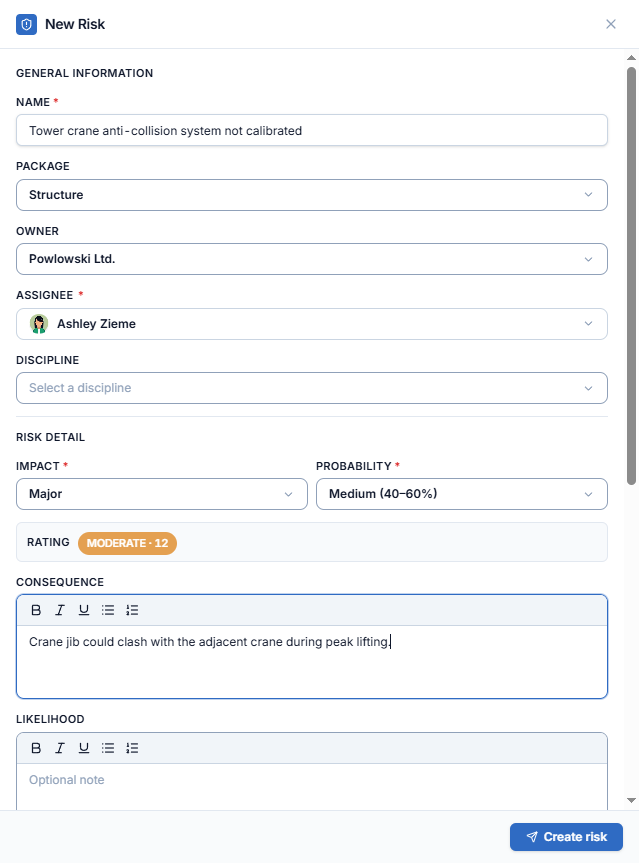
Under General Information, fill in:
- Name (required) — a short description of the risk.
- Package, Owner (the responsible stakeholder company) and Discipline.
- Assignee (required) — you are pre-filled; change it if someone else should follow up.
-
Under Risk Detail, choose Impact (required) and Probability (required). The Rating is calculated as soon as both are set.
-
(Optional) Describe the risk in the rich-text notes:
- Consequence — what happens if the risk occurs.
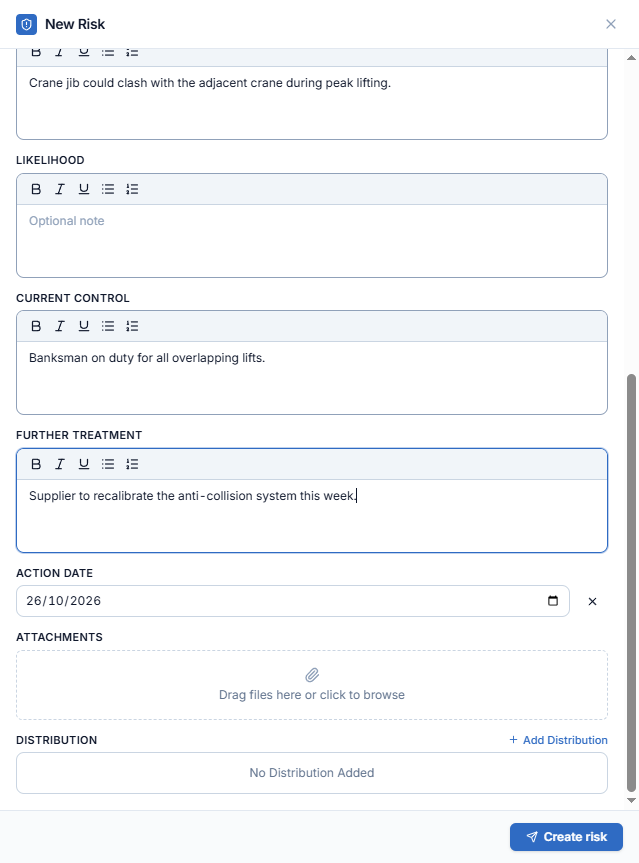
- Likelihood — why it may occur.
- Current Control — what is already in place.
- Further Treatment — what still needs to be done.
-
(Optional) Set the Action Date (today by default; × clears it), add Attachments, and click + Add Distribution to choose who is notified.
-
Click Create risk.
A toast confirms "Risk created". The new risk appears at the top of the list, with Date Raised set to today, and its detail opens.