Project Detail — Overview
Project Detail is the project's home page: its key information in one place, and a directory of everyone on the project.
The module is web-only — there is no mobile version.
Click Project Detail at the top of the navigation sidebar to open it.
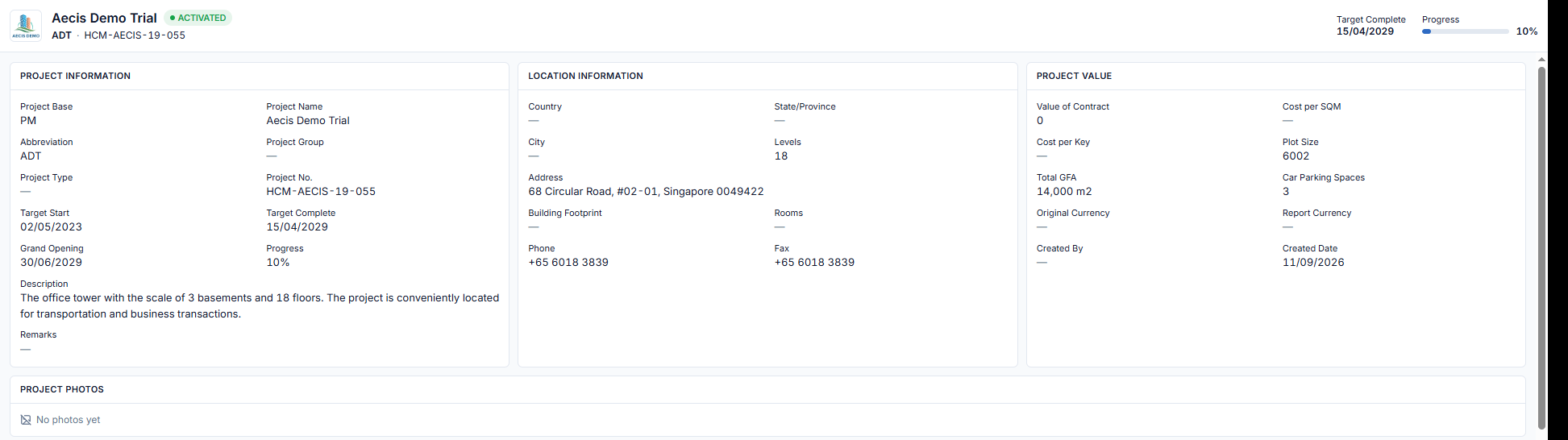
Header
The header shows the project name, its status (e.g. ACTIVATED), the project code, the Target Complete date and a Progress bar.
Information cards
| Card | What it shows |
|---|---|
| Project Information | Project Base, Name, Abbreviation, Group, Type, Project No., Target Start, Target Complete, Grand Opening, Progress, Description, Remarks |
| Location Information | Country, State/Province, City, Levels, Address, Building Footprint, Rooms, Phone, Fax |
| Project Value | Value of Contract, Cost per SQM, Cost per Key, Plot Size, Total GFA, Car Parking Spaces, Original and Report Currency, Created By, Created Date |
| Project Photos | Photos of the project. Shows "No photos yet" when there are none |
The page is read-only. Project information is maintained by the project administrator.
Project Directory
Below the cards is the Project Directory, the list of project members and their contacts.