The Stakeholder Roster
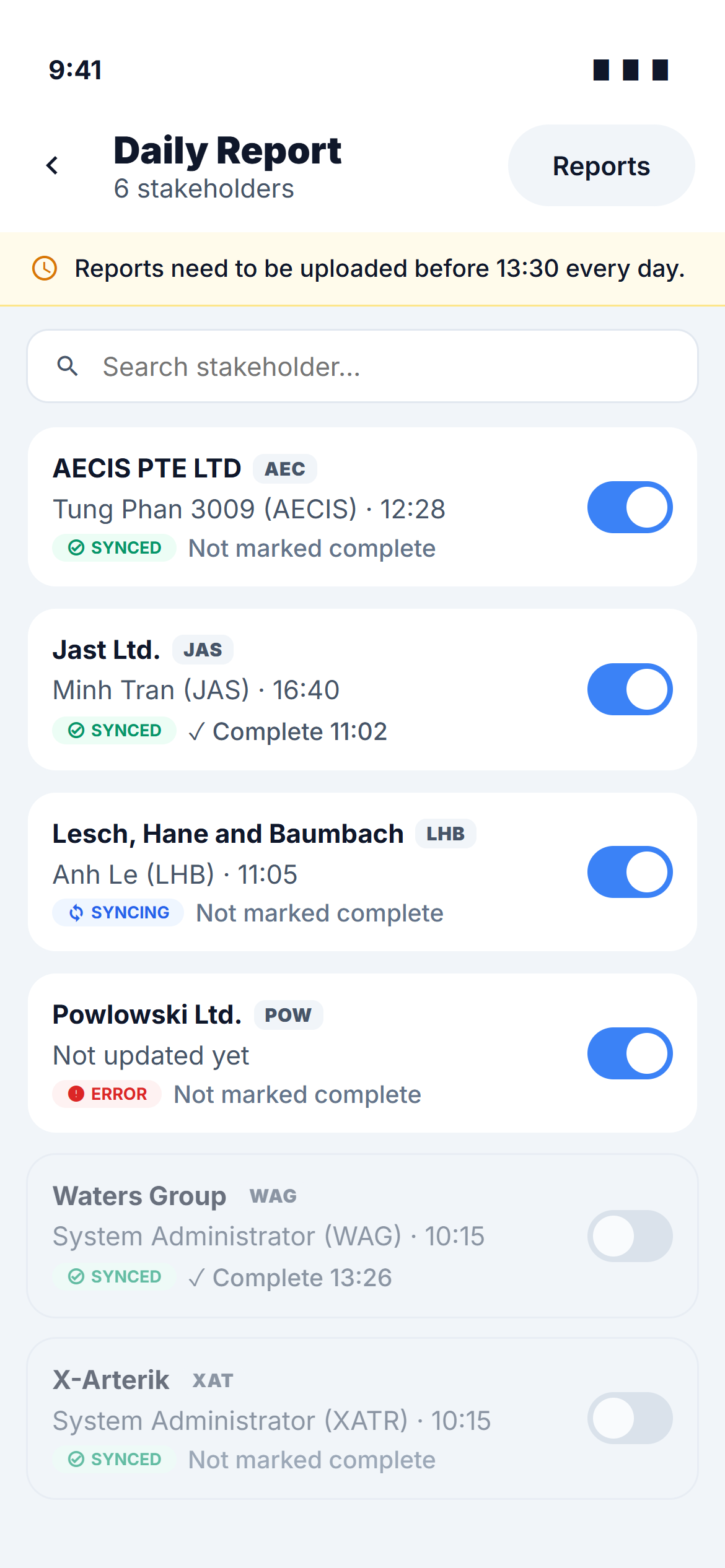
If you hold Read global or Write global, Daily Report opens on the roster — a single-column card list with one card per stakeholder on the project. It is the phone's version of the web roster and answers the same question: who has updated their report, how recently, and whether they have declared it done.
If you only hold Read all / Write all you never see this screen — the module opens straight into your own report.
The header
- The title Daily Report with the number of stakeholders listed beneath it.
- A Reports button that opens the Reports archive.
- A deadline line under the header: Reports need to be uploaded before 13:30 every day, where the time is the project's scheduled send time. After today's send has run, the same line reads Sent at 13:30 today — next send tomorrow at 13:30.
- A search box to narrow the list by stakeholder name.
What a card shows
| Part of the card | Shows |
|---|---|
| Name and abbreviation | The stakeholder's company name plus its three-letter tag, e.g. AECIS PTE LTD · AEC |
| Last update | Who last uploaded the report and at what time — or Not updated yet if nobody has touched it |
| Sync badge | The report's sync state on this device: Synced, Pending, Syncing or Error |
| Completion | ✓ Complete 11:02 once somebody tapped Mark as complete — otherwise Not marked complete |
| Enable / disable switch | Takes the stakeholder's report out of the day's reporting, or puts it back |
Tap anywhere on a card to open that stakeholder's editor. Counts and the Edit / Preview actions that the web roster keeps in its columns live inside the report on mobile, not on the card.
The web table shows attachment counts, photo counts and running totals per stakeholder. The card does not — it keeps to the three things you scan for on a phone: who updated, whether it synced, and whether it is marked complete.
The enable / disable switch
Switching a stakeholder off greys the card out and makes it untappable — you cannot open a disabled report, exactly as on web. Switching it back on restores it immediately.
Disabling hides the stakeholder from the day's send; it does not delete anything. There is no delete action anywhere in the module.
Reading the sync badge
The badge belongs to this device, not to the project. It tells you whether what you last did to that report has actually reached AECIS:
| Badge | Meaning |
|---|---|
| Synced | Everything saved here is on the project |
| Pending | A change is saved on the device and waiting for a connection |
| Syncing | Being sent now |
| Error | The last sync failed — open the report and use Retry, or look in Pending Uploads |
A stakeholder whose report you have never opened on this device simply shows Synced.
After the scheduled send
Nothing on the roster resets when the send runs. The last-update and completion lines keep their values, and editing any report from that point on feeds the next send. The deadline line is the only thing that changes — it switches to Sent at … — next send … for the rest of the day.