The Stakeholder Roster
The Daily Report list screen is a full-width table with one row per stakeholder on the project — not a list of dated entries. It answers one question at a glance: who has updated their report, and how recently.
Columns
The columns sit under two header bands.
Latest update — the freshness of each stakeholder's report:
| Column | Shows |
|---|---|
| Stakeholder | The company name plus its abbreviation |
| Report | When the report information was last updated |
| Attachments | How many PDF attachments the report currently holds |
| Zone Photos | How many photos the report currently holds |
| Submission | The date and time Submit was pressed — the moment of the click, not the day the work happened |
Total documents — the running totals for the stakeholder:
| Column | Shows |
|---|---|
| PDFs | Total PDF count |
| Photos | Total photo count |
Row actions
| Action | What it does |
|---|---|
| Edit | Opens that stakeholder's edit screen, replacing the whole screen |
| Enable / disable toggle | Takes the stakeholder's report out of use, or puts it back |
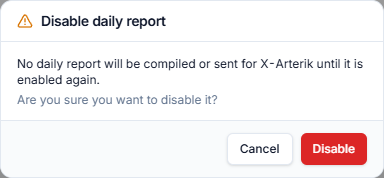
Disabling asks, enabling does not
Turning a stakeholder's report off opens a confirmation dialog, because it removes that stakeholder from the day's reporting. Turning it back on happens immediately with no dialog.
Toolbar
| Control | What it does |
|---|---|
| Reports | Opens the sent-report archive side panel |
There is no date-range filter, no search, and no column-visibility control on this screen — the roster is one row per stakeholder, short enough to read in full.

Reading the roster
- A blank Report stamp means that stakeholder has not touched their report yet.
- A blank Submission stamp means nobody has opened Preview and clicked Submit for that stakeholder. The scheduled send still compiles their report — Submit is a completeness stamp, not a gate.
- A filled Submission stamp records when the button was pressed, so the column doubles as an audit trail of who declared their report done and how late they left it. See Submission Date is the click, not the day.
- A stakeholder who filed nothing at all gets a single "No Daily Report" page in the compiled output instead of a full report. See the compiled report layout.