Preview and Submit
Preview is a full-screen surface showing the real compiled report — the same PDF the scheduled send would produce for the project's currently configured send time, built from the report's data as of the moment you open it.
It is not a mock-up or an approximation: what you see is what would go out.
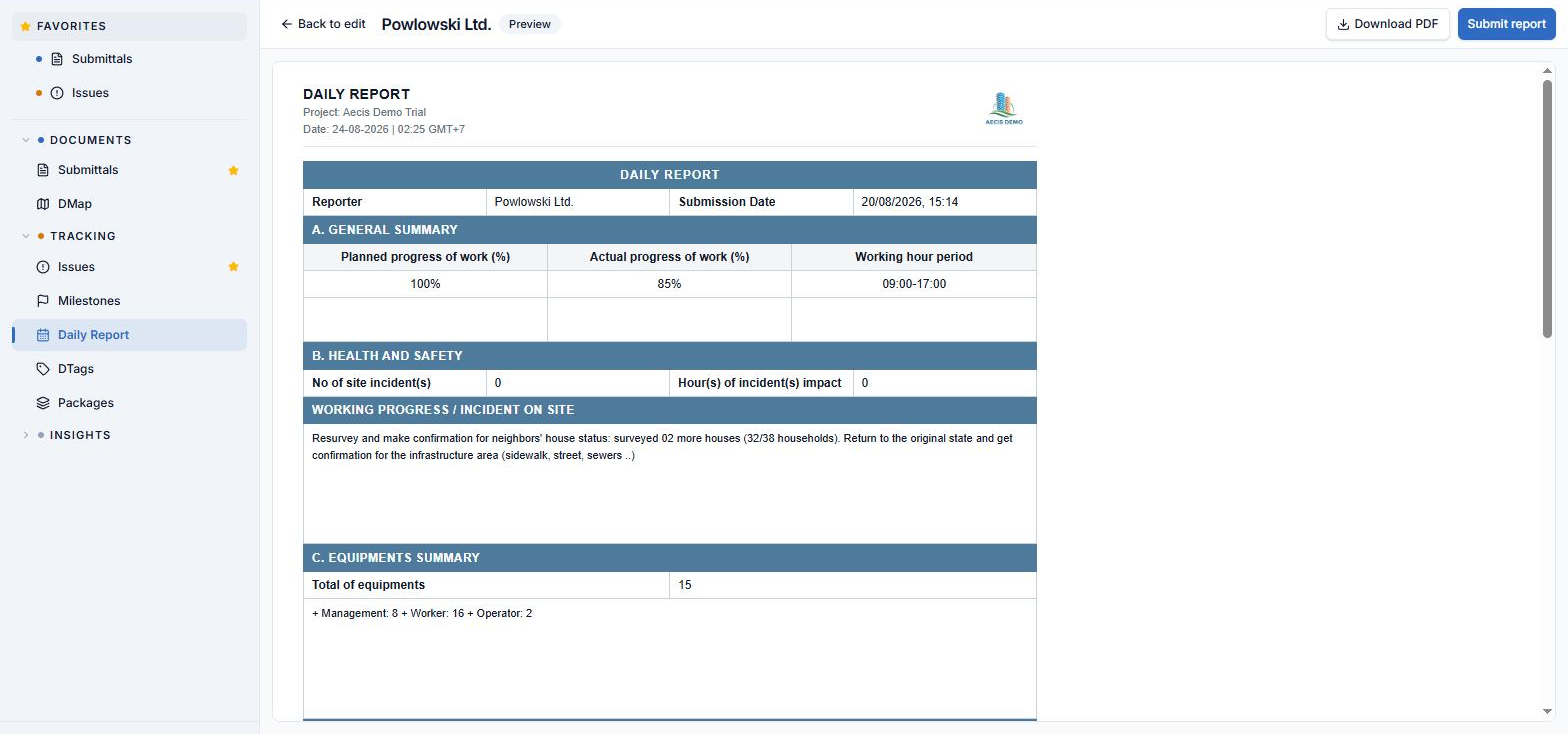
Opening Preview
Preview is blocked until validation passes. If a numeric field holds text, AECIS returns you to the Report tab so you can fix it first.
Three actions that are easy to confuse
| Action | What it does | What it does not do |
|---|---|---|
| Submit | Writes the moment you press the button — date and time — into the roster's Submission column, and shows a confirmation dialog | Does not produce a PDF file, does not archive anything, does not send an email |
| Download PDF | Downloads the rendered PDF you are looking at, on demand | Does not stamp completion, does not create an archive record |
| Scheduled send | Compiles every stakeholder's report, files the PDFs in the archive, and emails the project | Runs on its own schedule — it is not triggered by Submit |
Submit is the only place a report's completion is recorded. There is no separate status field and no approval workflow — one stamp, and it is done.
The Submission Date is the timestamp of the button press itself. It is not the date the work happened, not a date you can pick, and not the time the scheduled send runs.
Press Submit at 22:40 and the roster carries 22:40. Leave the same report untouched and press Submit the next morning instead, and it carries the next morning — the report's contents make no difference to the stamp.
Because the module has no status field, this timestamp is the project's only record of when a stakeholder declared their report done. It is an audit trail: submit when the report is actually finished, not in advance and not long after.
What the compiled report contains
Every page shares a header (report title, project name, date, reporter name, project logo) and a footer (license logo, page number, partner logo).
| # | Page | Contents |
|---|---|---|
| 1 | Main data page | Reporter name and submission date; a General Summary laid out as three columns — Planned progress %, Actual progress %, and Working hour period — each with its remark on the row directly beneath it; Health and Safety (incident count, incident-impact hours, remark); Equipment Summary (total quantity + remark); Man Power Summary (total quantity + remark) |
| 2 | PDF attachments | The stakeholder's uploaded PDFs, inserted as-is right after the main data page |
| 3 | Per-zone photo page | One section per zone, headed by the zone name, photos in a grid sized to the count |
| — | No Daily Report page | Used instead of pages 1–3 when the stakeholder filed nothing |
The two fallback pages
Both use the same design — a centred stakeholder name plus a short message — and differ only in wording and where they are inserted:
| Condition | Result |
|---|---|
| The stakeholder filed no report at all | A single "No Daily Report" page replaces their entire report |
| The stakeholder did report but uploaded zero photos | A "No Photo" page is inserted at the photo section's position only; the rest of the report renders normally |