Daily Report Module — Overview
This page covers the web app. For the phone version see the Daily Report Module (Mobile), or the Web ↔ Mobile differences.
The Daily Report module holds one living report per stakeholder for the project. Site engineers keep their company's report up to date — progress, working time, incidents, manpower, equipment, PDF attachments and site photos — and AECIS compiles it into a PDF and emails it out on a schedule you configure.
You will find it in the Tracking group of the navigation sidebar as Daily Report.
One report per stakeholder, not one per day
This is the single most important thing to understand about the module. Unlike a classic daily-log book, a project does not accumulate one entry per calendar date. Instead:
- The list screen is a roster of stakeholders — one row per company/party on the project.
- Each stakeholder has exactly one report record, edited continuously.
- There is no "reporting date" field on the report. The date that matters is the date a compiled report was generated and sent.
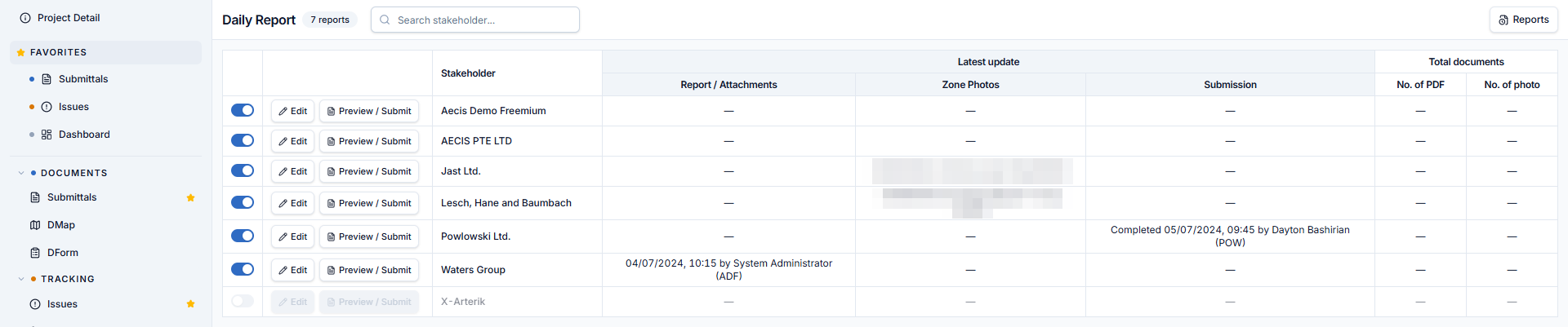
The daily rhythm comes from the scheduled send: every time the schedule fires, AECIS takes a snapshot of every stakeholder's current report, turns it into a PDF, files it in the archive, and emails the project.
Key concepts
| Term | Meaning |
|---|---|
| Daily Report | A stakeholder's living report record — one per stakeholder per project |
| Stakeholder | A company / party on the project; one roster row each |
| Zone | A node in the project's shared DTag tree; photos are filed by zone and the compiled report prints them zone by zone |
| Compiled report | The final PDF assembled from a stakeholder's report data |
| Preview / Submit | The full-screen surface for reviewing the compiled report and stamping it complete |
| Sent-report archive | The read-only list of PDF files the scheduled send has produced |
What the module is made of
| Screen | Purpose |
|---|---|
| Stakeholder roster | Who has reported, when, and how many documents they have attached |
| Edit screen | Fill in one stakeholder's report — the Report, Attachments, and Zone Photos tabs |
| Preview / Submit | Check the compiled PDF, download it, and stamp the report complete |
| Reports archive | Browse and open the files the scheduled send produced |
| Project Settings ▸ Daily Report | Zone scope for site photos |
| Project Settings ▸ Scheduler | When the report goes out and who receives it |
Who can do what
Daily Report uses four permissions, granted per role. They come in two reaches:
| Permission | Grants |
|---|---|
| Read all | Read the reports belonging to your own stakeholder |
| Write all | Edit the reports belonging to your own stakeholder |
| Read global | Read every stakeholder's reports in the project |
| Write global | Edit every stakeholder's reports in the project |
Default reach per project role:
| Role | Default permissions |
|---|---|
| PM, CM | Read global + Write global — the only roles trusted with project-wide reach |
| DC, QA, CON, SUB | Read all + Write all — their own stakeholder only |
| SE, CSL, CR, SO | Read all — their own stakeholder, read-only |
| User (baseline role) | Read all + Write all — their own stakeholder only |
The same reach governs the Reports archive: Read all shows only your own stakeholder's sent files, Read global shows every stakeholder's files plus the combined "ALL" file.
A daily report is a dated site record that is never removed, so the module has no Delete claim. A stakeholder's report can be disabled on the roster, which hides it — it is not deleted.